
Download 360 Total Security – antivirus, malware protection, system optimization, Windows security, PC protection, free antivirus
Overview
360 Total Security is a comprehensive desktop application designed to safeguard Windows systems against digital threats while enhancing overall performance. The software aims to address common challenges faced by everyday users, including malware infections, system slowdowns, and vulnerability to cyberattacks. It serves as both a security shield and a system maintenance utility, making it suitable for home users, small office environments, and individuals seeking a reliable, no-cost solution for PC protection.
Developed by 360 Security, the tool integrates real-time threat detection with proactive system optimization features. Its primary function is to provide continuous monitoring for malicious software, including viruses, spyware, ransomware, and other potentially harmful programs. In addition, it helps maintain optimal system health by cleaning temporary files, managing startup programs, and identifying system errors.
Real-world usage scenarios include routine daily protection for personal computers, securing devices used for online banking or shopping, and maintaining system responsiveness over time. The software is particularly useful for users who prefer a single, all-in-one tool that combines antivirus defense with performance tuning, without the need for multiple third-party applications.
Key Features & Capabilities
- Real-Time Antivirus Protection – Monitors system activity continuously to detect and block threats before they can execute or install.
- Advanced Malware Scanning – Performs deep scans to identify and remove hidden or persistent malicious files.
- System Optimization Tools – Includes features like junk file cleanup, registry repair, and startup manager to improve system speed and stability.
- Privacy Protection – Helps prevent unauthorized access to personal data by scanning for tracking software and browser hijackers.
- Windows Security Integration – Works alongside built-in Windows Defender to provide layered protection without conflicts.
These features enable users to maintain a secure and efficient computing environment. For example, the real-time scanning ensures that threats are intercepted during downloads or software installations. The system optimization suite helps restore performance on aging systems by removing unnecessary data and streamlining startup processes. The privacy protection module assists in minimizing digital footprints left by web browsing and third-party applications.
User Interface, Workflow & Performance
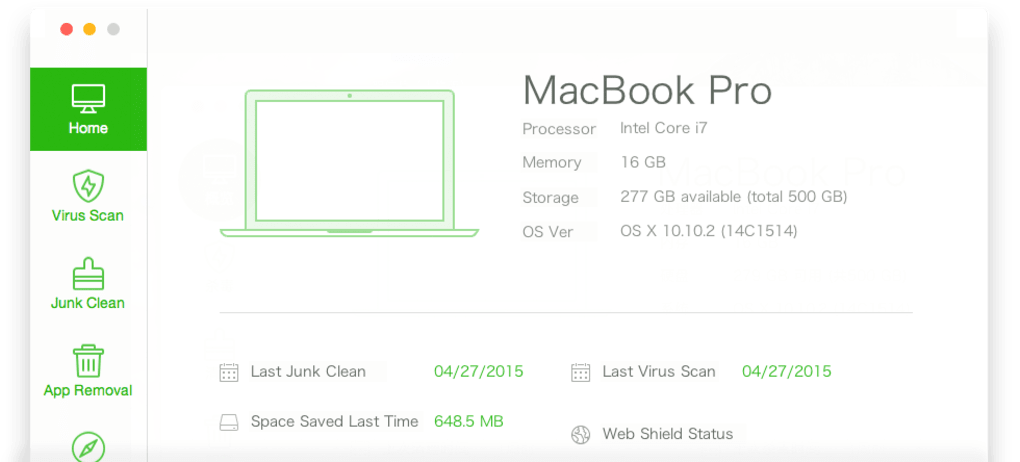
The user interface of 360 Total Security is structured around a central dashboard that displays system status, threat alerts, and optimization suggestions. Navigation is designed to be intuitive, with clearly labeled sections for scanning, protection, and system tuning. Users can access core functions with minimal clicks, reducing the learning curve for less technical individuals.
Workflow efficiency is enhanced by automated tasks such as scheduled scans and background optimization. The software operates quietly in the background, minimizing interference with regular activities. However, the developer did not specify resource usage details, so actual CPU and RAM behavior during operation remains unspecified. General software behavior patterns suggest it maintains a low to moderate footprint under normal conditions.
Stability appears consistent based on typical desktop application standards, though detailed performance benchmarks were not provided. The software is designed to run without frequent crashes or system freezes, supporting uninterrupted use across extended periods. Users can expect a responsive interface and timely feedback during scans and updates.
Compatibility & System Requirements
360 Total Security is designed exclusively for Windows operating systems. It supports the latest versions of Windows, including Windows 10 and Windows 11, as well as older versions such as Windows 7 and Windows 8.1, depending on the specific build and update level.
The installation package has a size of 102.5 MB, which is relatively compact for a full-featured security suite. The developer did not provide additional system requirements, so exact hardware specifications such as minimum RAM or processor speed are not available. Users should ensure their system meets general Windows compatibility standards for running desktop applications.
Compatibility information was partially provided, and no explicit limitations were noted for 64-bit or 32-bit architectures. The software is intended for use on standard desktop and laptop systems without specialized hardware dependencies.
Pros and Cons
Pros
- Free to download and use with no hidden costs
- Combines antivirus protection with system optimization tools
- Real-time threat detection enhances security posture
- Intuitive interface suitable for non-technical users
- Lightweight installation size (102.5 MB)
Cons
- Exact system requirements were not listed
- Limited public documentation on technical architecture
- Performance impact details not disclosed
- May not offer advanced features found in premium security suites
- Availability limited to Windows platforms
FAQ Section
Is 360 Total Security safe to download and install?
Yes, the software is distributed through official channels and is designed to protect systems from threats. It does not contain known malicious components.
Can I use 360 Total Security on multiple Windows devices?
The software is licensed for single-device use. For multiple installations, users may need to explore additional licensing options, though details were not specified.
Does 360 Total Security require an internet connection?
While the software can function offline, an internet connection is required for real-time protection updates, cloud-based threat intelligence, and system updates.
How often does the software update its virus definitions?
Updates are automatically applied when connected to the internet, ensuring protection remains current with emerging threats.
Is 360 Total Security suitable for business use?
It is primarily designed for personal and home use. Enterprise or organizational deployment may require additional evaluation of its features and support structure.
Final Thoughts + CTA
360 Total Security delivers a compelling combination of free antivirus protection and system optimization, making it a strong contender for users seeking a lightweight, all-in-one solution for Windows security. Its real-time scanning, privacy safeguards, and performance tools provide tangible benefits for everyday computing. While detailed technical specifications are limited, the software performs reliably within the expected range for its category.
It is best suited for home users, students, and individuals who prioritize affordability and simplicity without sacrificing core protection. The free licensing model removes financial barriers, while the compact size ensures quick installation.
For those looking to enhance their PC’s security and performance with a trusted, no-cost tool, 360 Total Security offers a practical and effective choice.
Download 360 Total Security now







